Deployment Tracking Tool
Let me ask you a question. Are you using any kind of a software tool to track deployments of builds, configuration changes (both SW and HW), software updates in your corporate environment?
If so, then can you give some recommendations? If not, would you be interested to use such tool?
Some use cases I foresee:
- you have multiple HW machines available for your project
- you release builds every couple weeks or months, builds are from multiple branches (some are planned to be deployed to Production system soon, some are planned only for QA system, for example)
- in case of Production-level build, the build must follow path Dev -> QA -> Staging -> Production
- for every build, you need to keep associated files: deployment checklist, release notes, build file etc.
- every change in the environment should be audited (author, timestamp, etc.)
- when moving build from environment to environment (QA to staging), it should be possible to easily reuse some of the artifacts (check list, release notes, but possible to change them)
- this tool should hold all artifacts (documents), links (bug tracker, source code repository, link to build, etc.)
- this tool should allow easy collaboration
- this tool could allow easy creation (editor) of deployment checklists, based on history etc.
- I could found more and more…
From my experience, there are many projects that require some tool like this. Some projects are using excels stored locally in user machines, some are smarter and are using for example google doc spreadsheet for easy collaboration.
Thanks
Travel: Hrad Kost

Let s Airbus A380
Minulý týden jsem absolvoval spolu s filemonem a jirkou píšou z JetMinds další příjemnou pracovní cestu do USA, opět Kalifornie a Silicon Valley. Z Paříže do San Francisca jsme letěli s Air France a to novým dvoupatrovým Airbusem A380, největším dopravním letadlem současnosti.

Inženýři Airbusu byli asi trochu hračičkové, protože každý pasažér má kdykoliv během letu možnost si na displeji na svém sedadle volit pohled ze tří kamer na letadle, které poskytují žívý obraz z letu:
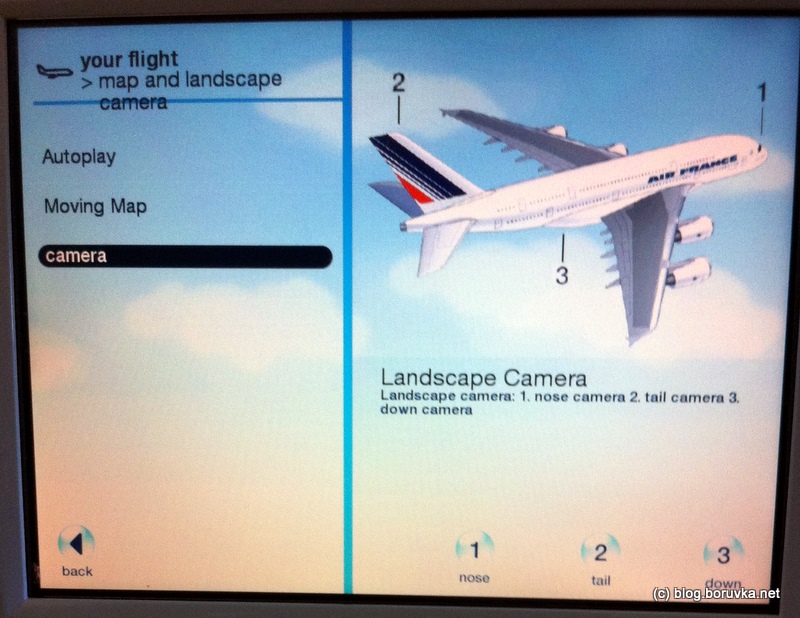
Pohled z kamery na „ocase“ poskytuje uklidňující přehled situace, i když nesedíte u „okénka“ 🙂


A finále, těsně před přístáním na SFO – San Francisco International Airport:

U letadla je to taková „nice-to-have“ feature , ale potěší 😉
rails 3.0 on windows 7: problem with sqlite3
Yesterday I spent couple of hours fighting with Ruby 1.9.2 / Ruby on Rails 3.0 installation on Windows 7 Professional (64 bit). I always hit some kind of problem related to sqlite3 database (that is used by default in Ruby on Rails). There are number of hints, tutorials and forums on this topic on internet, but sometimes misleading. The cause of problem was version of the DLL file.
So next time, when you hit problem like this:
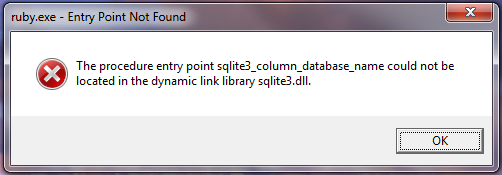
And you will see this error message:
/ruby/lib/ruby/gems/1.9.1/gems/sqlite3-1.3.3-x86-mingw32/lib/sqlite3.rb:6:in `require‘: no such file to load — sqlite3/sqlite3_native (LoadError)
from C:/dev/ruby/lib/ruby/gems/1.9.1/gems/sqlite3-1.3.3-x86-mingw32/lib/sqlite3.rb:6:in `rescue in ‚
from C:/dev/ruby/lib/ruby/gems/1.9.1/gems/sqlite3-1.3.3-x86-mingw32/lib/sqlite3.rb:6:in `rescue in ‚
…
You can follow these instructions to get it fixed. This blog post is also for me so I don’t forgot this one 🙂
To install Ruby on Rails 3.0 on Windows 7 with sqlite3 from scratch, follow next steps:
- download and install Ruby using installer – rubyinstaller-1.9.2-p180.exe from http://rubyinstaller.org/
- download sqlite3 DLL from http://www.sqlite.org/sqlitedll-3_7_3.zip and unzip into ruby/bin dir
(= 2 files: sqlite3.def, sqlite3.dll) - check version of ruby: ruby -v (expected 1.9.2+)
- gem install rails
- check version of rails: rails -v (expected 3.0+)
- to verify that your installation works properly, try to create a new rails app and test it:
rails new foo
cd foo
bundle install
rails generate scaffold Foo name:string email:string
rake db:migrate
rails s
This looks pretty obvious, but it was a few hours battle to get here. Even the Ruby on Rails 3 Tutorial book by Michael Hartl mentions problems with version of sqllite3 gem (1.2.5 vs. 1.3.1) that requires hacking of the auto-generated Gemfile.
IMPORTANT
The key to success here is to download the DLL exactly from here http://www.sqlite.org/sqlitedll-3_7_3.zip. Because the latest version of DLL from http://sqlite.org/download.html does not work and you get into troubles, thinking the problem is in gem or wrong location of DLLs… It is not, latest version of this DLL simply does not work with this version of Ruby!
 milan boruvka / log